
Page updated: 08/19/2026
***TREplus is the new and improved version of TRE.
TREPlus client OS Support:
- Windows 10 Pro and Windows 11 Pro
- Windows Server 2016 and higher
- Windows 7 and earlier are NOT supported
Note: The PC hardware specs for the above version should match the recommended specification from the Windows version.
The Current Released version of TREPlus client is:
TREPlus v2026.08.19
- Updates for SXM Sending of brake information, plus ROC Titles rather than descriptions.
August 2026 releases
TREplus v2026.08.14
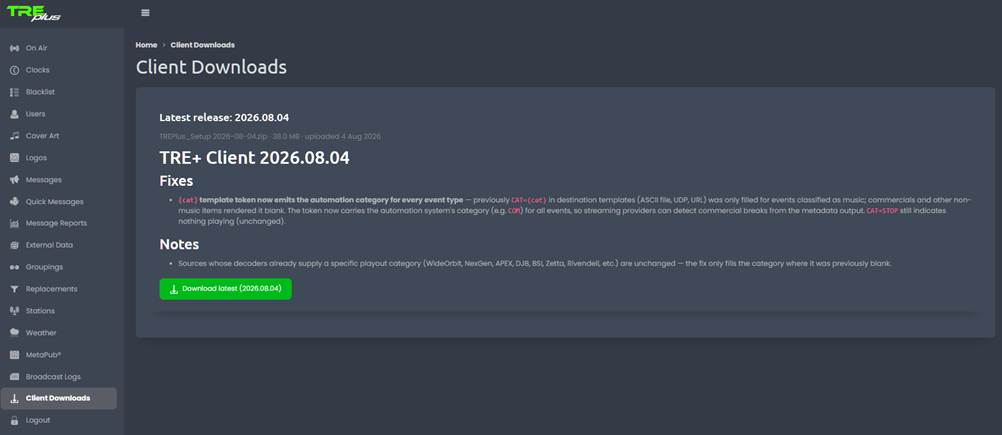
New Menu option on TREplus Website.
TREplus Client Download from the TREplus website is now available.

TREplus v2026.08.14
- TRE+ station notes: SiriusXM endpoints and backup automation servers.
Applies to: TRE+ client 2026.08.13 and later, with the matching Tempo server release.
Audience: station engineers and support techs.
Three things changed in this release:
- Two of them are for you to configure in the web portal instead of on the station PC.
- The third is a fix you don't have to do anything about.
TREplus v2026.08.13
Fixes
- Reduced connection pool timeout to accommodate NAT Remote connection drops. added logging.
TREPlus v2026-08-12
- XM Fix and better logging of as runs
Previous release: v2026-06-23
Functional Changes:
- Linked Playout Category filter (client side).
- Linked messages can now be restricted to fire only when a specific raw playout category is playing, not just the
coarse All / Music / Break filter available on previous versions.
- Nothing changes unless a customer actively sets a category on a Linked message.
There are no config changes required on existing installs.
Previous releases
TREplus 2026-06-18
This version's fixes:
- Writing N/A in Album Info.
-Adds sFTP support
*** TRE (legacy) software and RBDS.net website
The last Released version of TRE was:
2.9 Build 122 - 7/11/2016
The last Release Candidate version of TRE was:
2.9 Build 123 RC 014 - 04/12/2018
As of 4/1/2024 RBDS.net website is permanently off-line.
It has been replaced with a new TREplus site.
Please contact BE Sales to upgrade to TREplus.
Service Note:
I you need a copy of the above software, please reach out to Tech Support by email:
Provide:
Contact Name
Call letters
Version requested